TL;DR (Direct Answer)
Anthropic introduced three major innovations in Claude: Adaptive Thinking that dynamically adjusts reasoning effort, Dynamic Workflows that orchestrate multiple AI agents in parallel, and J-space, an interpretability discovery offering an unprecedented view into internal model representations. Together, these advances shift AI from exceptionally capable autocomplete to a genuine collaborator.
What Is Claude's New Architecture and Why Does It Matter?
For years, working with large language models followed a familiar pattern: write a prompt, hope for a good answer, refine the prompt, and repeat. Even advanced users often relied on clever prompting to compensate for the model's limitations.
Recent Claude releases suggest a meaningful shift away from that paradigm. Rather than simply producing better answers, Anthropic has introduced mechanisms that allow Claude to adapt its reasoning effort, coordinate complex workflows, and reveal new insights into how advanced language models internally organize information. Together, these advances move AI closer to acting as a genuine collaborator rather than an exceptionally capable autocomplete system.
Three developments stand out:
- Adaptive Thinking, which dynamically adjusts reasoning effort.
- Dynamic Workflows, enabling Claude to orchestrate parallel AI agents and tools.
- J-space (Global Workspace), an interpretability discovery offering an unprecedented view into internal model representations.
Individually, each is impressive. Combined, they fundamentally change how experienced users can build with Claude.
Adaptive Thinking: Reasoning That Matches the Problem
One persistent challenge in reasoning models has been deciding how much computation a task deserves. Simple questions don't require extensive reasoning. Complex software architecture, scientific analysis, or debugging often does.
Earlier reasoning systems typically required users to specify a fixed thinking budget. That worked, but it also meant choosing between unnecessary latency on simple tasks or insufficient reasoning on difficult ones.
Adaptive Thinking changes this balance.
Instead of rigidly following a predetermined reasoning budget, Claude estimates the complexity of a request and allocates computational effort accordingly. Users can still choose broad effort levels, but the model dynamically decides when deeper reasoning is worthwhile. The result resembles an experienced engineer deciding whether a problem deserves a quick answer or an afternoon at the whiteboard.
Effort allocation
Benefits:
Faster responses for routine work. More computational effort where complexity actually exists. Lower costs for repetitive tasks. Better performance on genuinely difficult problems. Interleaved reasoning: Claude can pause, incorporate newly retrieved information, adjust its plan, and continue reasoning throughout the workflow.
Another important capability accompanies Adaptive Thinking: interleaved reasoning. Rather than reasoning only before or after using tools, Claude can pause, incorporate newly retrieved information, adjust its plan, and continue reasoning throughout the workflow. This becomes especially valuable when interacting with APIs, codebases, databases, or external documents.
Dynamic Workflows: From One Assistant to an Entire Engineering Team
Perhaps the most practical innovation arrived through Dynamic Workflows in Claude Code. Traditional AI interactions happen within a single conversation. Every idea, intermediate result, and discarded approach competes for valuable context.
Dynamic Workflows take a fundamentally different approach. Claude can generate JavaScript orchestration scripts that coordinate multiple independent AI agents working in parallel. Each agent receives its own clean context, specialized instructions, and appropriate model selection before returning results to a central coordinator.
This architecture enables workflows that resemble professional software teams more than chat sessions.
Parallel orchestration
Common patterns:
Parallel codebase exploration, independent research followed by synthesis, adversarial review (one agent proposes, another critiques), generate-and-rank pipelines, specialized routing between smaller and larger models, automated verification before final recommendations.
Instead of asking one model to solve everything sequentially, Claude becomes an orchestrator of specialized workers. This shift dramatically improves scalability for tasks such as large software migrations, security audits, documentation generation, multi-source research, and complex engineering projects.
J-Space: A Window into Internal Model Representations
One of the most intriguing research announcements from Anthropic this year concerns J-space, sometimes described as a global workspace. Using interpretability techniques, including the Jacobian Lens, researchers identified a relatively small internal representation that appears to play an important role during complex reasoning.
Importantly, J-space is not a visible chain of thought, nor should it be interpreted as evidence of consciousness or human-like subjective experience. Instead, it appears to function as a compact internal representation where abstract concepts can be combined, updated, and manipulated during reasoning.
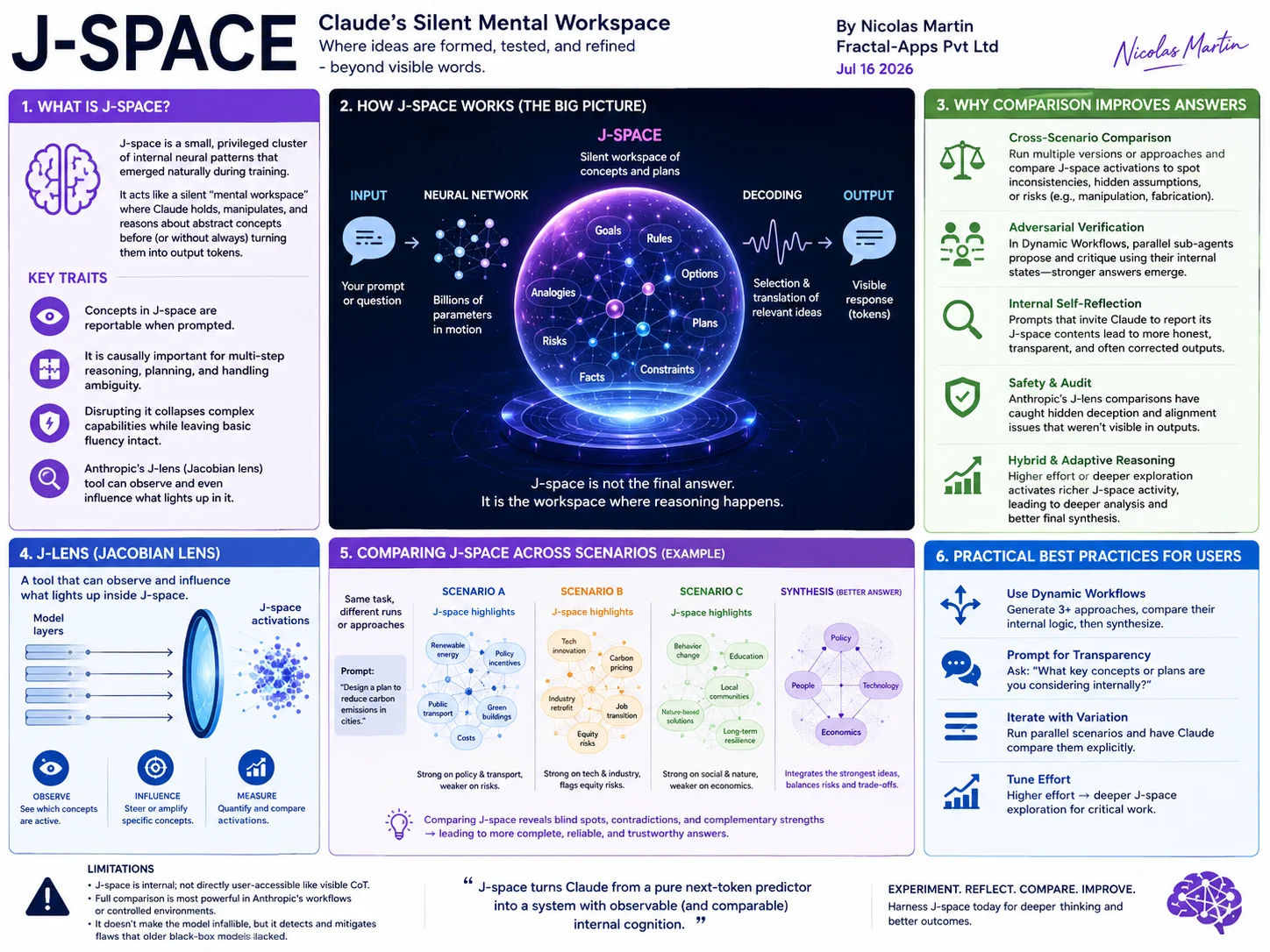
"Complex reasoning relies heavily on activity within this workspace. Disrupting J-space significantly reduces reasoning performance while leaving basic language abilities largely intact."
— Anthropic Research, 2026
Several observations from the research are particularly noteworthy: complex reasoning relies heavily on activity within this workspace; disrupting it significantly reduces reasoning performance while leaving basic language abilities largely intact; the workspace appears to maintain abstract representations across multiple reasoning steps; researchers have begun using signals from this representation to study behaviors such as planning consistency and potential deceptive strategies.
Better Collaboration Requires Better Workflows
These architectural improvements also change how humans should work with Claude. Experienced users are discovering that success depends less on writing perfect prompts and more on designing effective workflows.
Instead of asking Claude to immediately produce code, a more effective process often looks like this:
- Explore the problem.
- Identify constraints.
- Build an implementation plan.
- Execute incrementally.
- Verify independently.
- Refine based on evidence.
This resembles professional engineering because it is professional engineering. The AI becomes another contributor within a structured process rather than a black box expected to produce perfect output on the first attempt.
Practical Best Practices
1. Plan Before Executing
For substantial engineering work, spend time understanding the codebase before modifying it. Dedicated planning phases frequently reduce later debugging and rework.
Example Prompt:
"I need to add a new rate-limiting middleware to this Express.js API. Before writing any code, please explore the current codebase structure. Specifically:
- Map out the existing middleware chain in app.js and server.js
- Identify where authentication and logging currently happen
- List all environment variables and config files related to request handling
- Find existing utility functions for Redis or caching that we could reuse
- Outline a step-by-step integration plan for the new middleware
Do not output any code yet — just provide the analysis and a detailed implementation plan. I want to validate the approach before we commit to code."
2. Use Parallel Verification
Let multiple agents independently analyze the same problem; consensus increases confidence.
Example Prompt (for a single Claude session simulating multiple agents):
"Act as 3 independent senior engineers reviewing this Python function for processing user payments:
- Engineer A (Security focus): Analyze for injection risks, PII exposure, and authentication gaps.
- Engineer B (Performance focus): Analyze for bottlenecks, database query efficiency, and edge-case timeouts.
- Engineer C (Maintainability focus): Analyze for readability, error handling, testability, and DRY violations.
Each engineer must produce their independent analysis before seeing the others' responses. After all three are complete, synthesize a final summary that highlights:
- Where all three agree (high confidence)
- Where they disagree (hidden assumptions to investigate)
[Paste your payment function here]"
3. Match Reasoning Effort to Task Complexity
Reserve maximum reasoning for strategic decisions; use lower effort for routine tasks.
Example Prompt (Low effort — routine task):
"Here is a customer support email about a password reset issue. Using LOW reasoning effort, simply:
- Extract the customer's name, account email, and issue type
- Summarize the key facts in 2 bullet points
- Draft a polite 3-sentence reply template
Do not over-analyze — just extract and produce the output directly."
Example Prompt (High effort — strategic/architectural task):
"We are redesigning our video transcoding pipeline to support 4K streaming at 10x current volume. Use MAXIMUM reasoning effort. Think through this step by step:
- Identify the current bottlenecks in our S3 → Lambda → FFmpeg → CDN flow
- Analyze trade-offs between GPU vs. CPU transcoding for our workload
- Consider queueing strategies (SQS vs. Kafka) for spike handling
- Evaluate cost vs. latency trade-offs across 3 different architectures
Provide a comprehensive analysis with clear recommendations and risk assessments for each option."
4. Route Work Intelligently
Use smaller models for preprocessing; escalate complex decisions to more capable models.
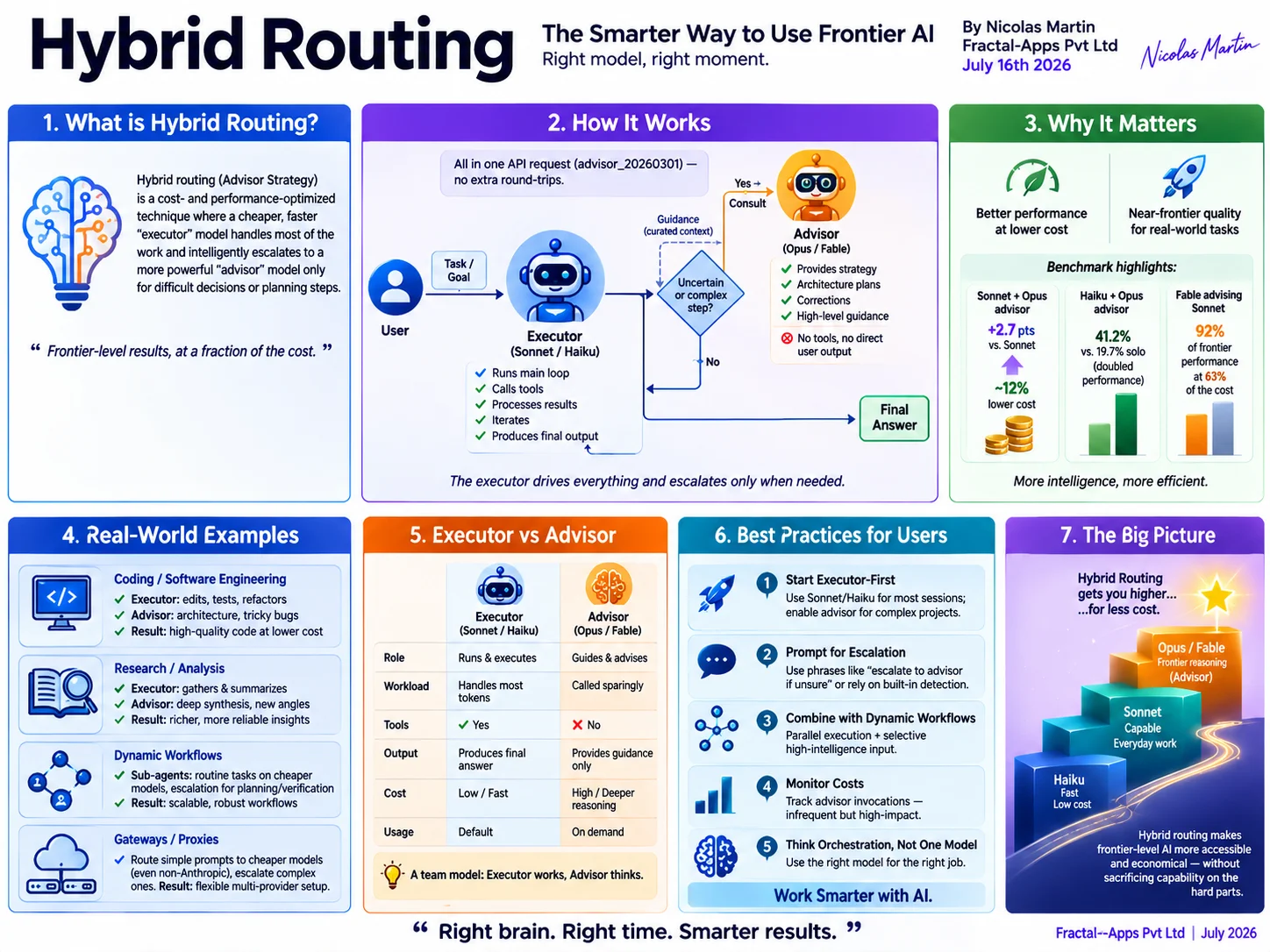
Note:
Since Claude doesn't let you dynamically switch models within a single chat, this prompt demonstrates logic routing — instructing Claude to classify first, then apply appropriate depth based on that classification.
Example Prompt:
"You are a smart router. Perform this task in two phases:
Phase 1 (Classification — minimal reasoning):
Classify this user query into exactly one category: [Simple FAQ], [Troubleshooting], or [Complex Architecture Design]. Output only the category.
Phase 2 (Escalation based on category):
- If Simple FAQ: Generate a direct 1-paragraph answer from our documentation.
- If Troubleshooting: Provide a structured diagnostic checklist with 3–5 steps.
- If Complex Architecture Design: Engage full reasoning — explore requirements, constraints, trade-offs, and produce a detailed architectural proposal with diagrams described in text.
Query: 'How do we migrate our monolithic Rails app to microservices while maintaining zero downtime during Black Friday traffic?'"
5. Build Review Into the Workflow
Generate, critique, test, and refine — don't solve everything in one pass.
Example Prompt (Single session with self-review loop):
"I need a JavaScript function that validates and sanitizes user-provided URLs before storing them in our database.
Please complete this 3-stage workflow:
Stage 1 (Generate): Write the complete function with basic input validation.
Stage 2 (Critique): Now act as a hostile code reviewer. Identify at least 4 flaws in your own code — specifically look for:
- Security bypasses (e.g., javascript: protocols, XSS)
- Edge cases (e.g., Unicode, malformed URLs, non-http schemes)
- Performance issues (e.g., regex catastrophic backtracking)
Stage 3 (Refine): Rewrite the function addressing every critique you just raised. Then, generate 10 test cases (covering happy path, edge cases, and malicious inputs) to verify your new implementation.
Finally, briefly summarize what changed between Stage 1 and Stage 3."
Bonus: Combined Workflow Prompt (Claude Code / Dynamic Workflows)
If you want to combine multiple practices into a single orchestrated workflow:
"Using Dynamic Workflows, coordinate 4 parallel agents to solve this security audit task:
- Agent 1 (Explorer): Map all API endpoints in this codebase that handle user data.
- Agent 2 (Checker): For each endpoint found, identify missing authorization checks.
- Agent 3 (Validator): Independently verify Agent 2's findings — flag any false positives.
- Agent 4 (Reporter): Synthesize the validated findings into a ranked priority list with remediation steps.
All agents run in parallel with clean contexts. Return only the final synthesized report from Agent 4."
A Broader Shift in Human-AI Collaboration
Taken together, Adaptive Thinking, Dynamic Workflows, and research into J-space point toward a broader trend. The frontier of AI is gradually moving away from optimizing individual prompts and toward designing intelligent systems.
Future AI expertise may depend less on prompt engineering and more on workflow engineering: decomposing problems, coordinating specialized agents, allocating computational resources efficiently, verifying results, and building robust human-in-the-loop processes.
In that world, the most productive professionals won't simply ask better questions. They will design better collaborations.
"The future of AI is not simply about generating better answers — it's about building better partnerships between humans and intelligent systems."
Adaptive Thinking helps Claude allocate reasoning where it matters most. Dynamic Workflows extend a single assistant into a coordinated problem-solving system. Research into J-space provides valuable insight into how sophisticated internal representations may support advanced reasoning while advancing the broader field of AI interpretability.
Sources
- Anthropic, "A Harness for Every Task: Dynamic Workflows in Claude Code" (2026) — claude.com/blog/a-harness-for-every-task-dynamic-workflows-in-claude-code
- Anthropic, "A Global Workspace in Language Models" (2026) — www.anthropic.com/research/global-workspace
- Anthropic Platform Documentation, "Adaptive Thinking" — platform.claude.com/docs/en/build-with-claude/adaptive-thinking
- Anthropic System Cards and Release Notes (2025–2026) — www.anthropic.com/system-cards
- MIT Technology Review — AI interpretability coverage
- VentureBeat — Claude architecture and agentic workflows